参考战神的风场设计思路在 URP 管线下实现了一套风场系统,并依据现在的 Compute 管线特点进行了设计调整,同时增加了对流体涡旋的模拟,下面就这套系统进行具体的介绍。
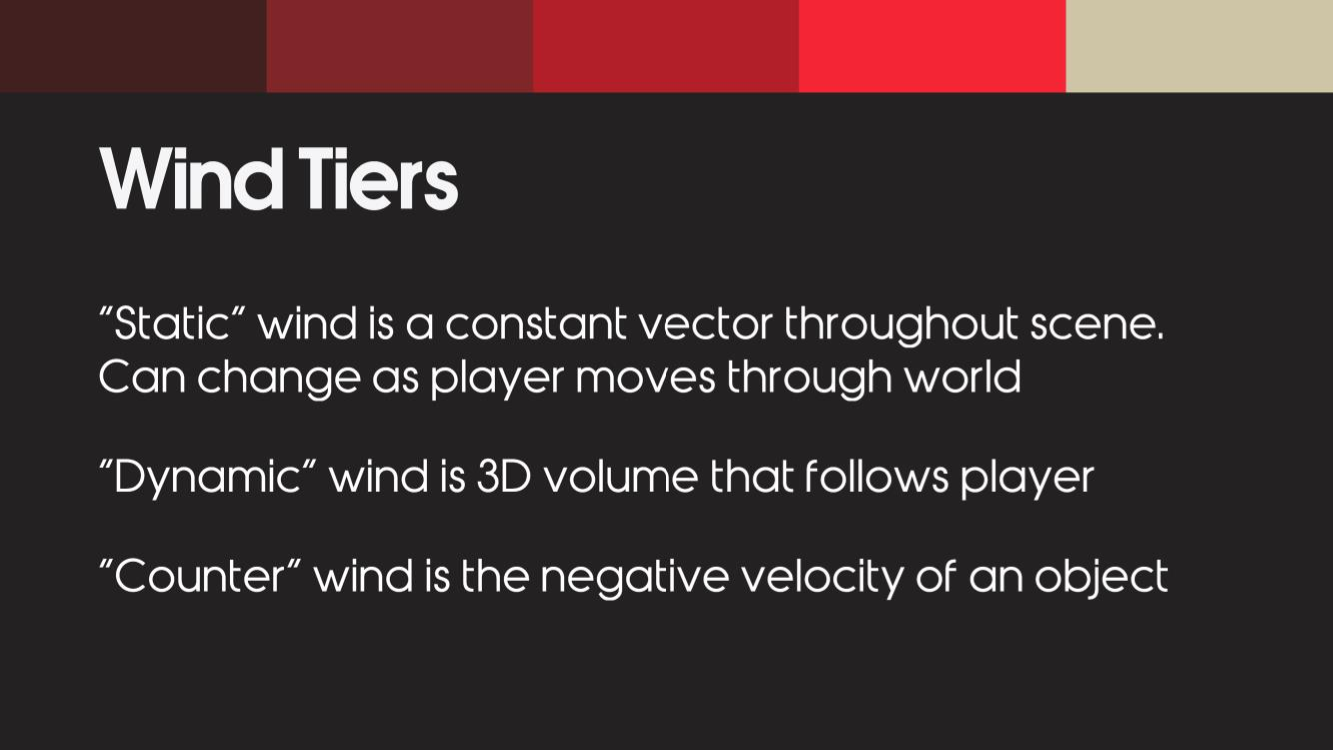
1. 核心架构与管线设计 原理 战神的开发者将全局风,分级为 3 部分 [Wind Tiers] 全局静态风 +动态风 -物体移动速度
1 SampleWind(object) := StaticWind + DynamicWind[object.postion] + -object.velocity
即,风的影响的采样公式 = 全局静态风一个vector3 + 动态风场中物体位置的风采样 - 物体的移动速度vector3;
通过风力 Volume 控制动态风场作用范围,体积外仅仅启用全局静态风场,内部启用动态风场+静态+物体移速。
静态风: 静态风是一个全局的风,均匀地应用于场景中的所有物体。它可以随着时间的推移而改变,也可以随着玩家在世界各地的移动而改变。有时会用scrolling noise texture 来做静态风。
动态风: 动态风是他们的重点,作用范围是在玩家周围形成一个3D立体的空间,并随着玩家的移动而移动的。
逆风: 逆风是其实是一个机制,用来模拟在风中移动的物体,是否受到风的影响。 如果一个物体的运动速度和方向与静态风或动态风大致相同,就会抵消风的作用,并给出物体不受风影响的表现。
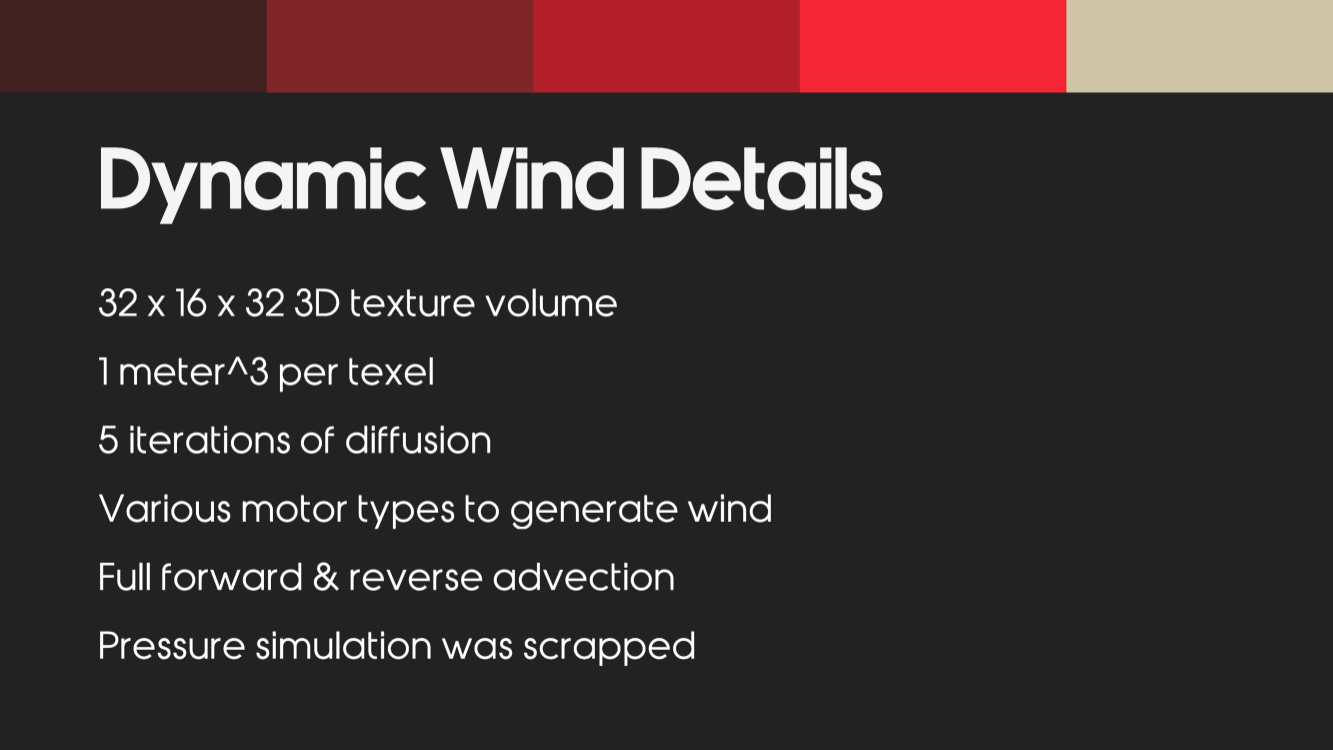
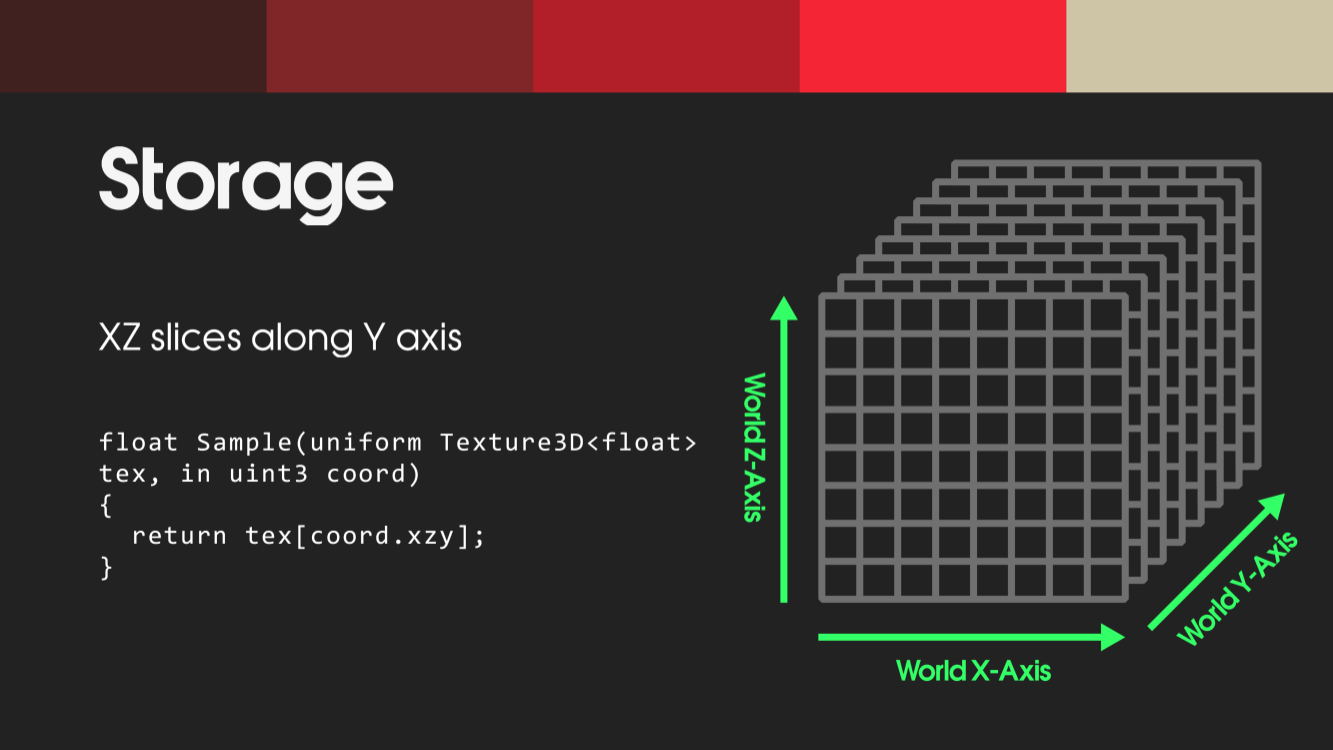
Dynamic WindDetails 对于动态风场,战神开发者用32x16x32 的三维纹理来存,每立方米 一个纹理单位。 为了在GPU上快速方便的模拟风的计算,选择了标准的三维纹理volume,而没有使用层次化的volume。
战神的动态风场在玩家周围也足够大,能包含斧头扔出去的距离。所以他们的动态风场xz是比y大一倍的。
使用每帧5次的迭代,没有什么特别考虑,只是刚好找到了一个比较balance的值。
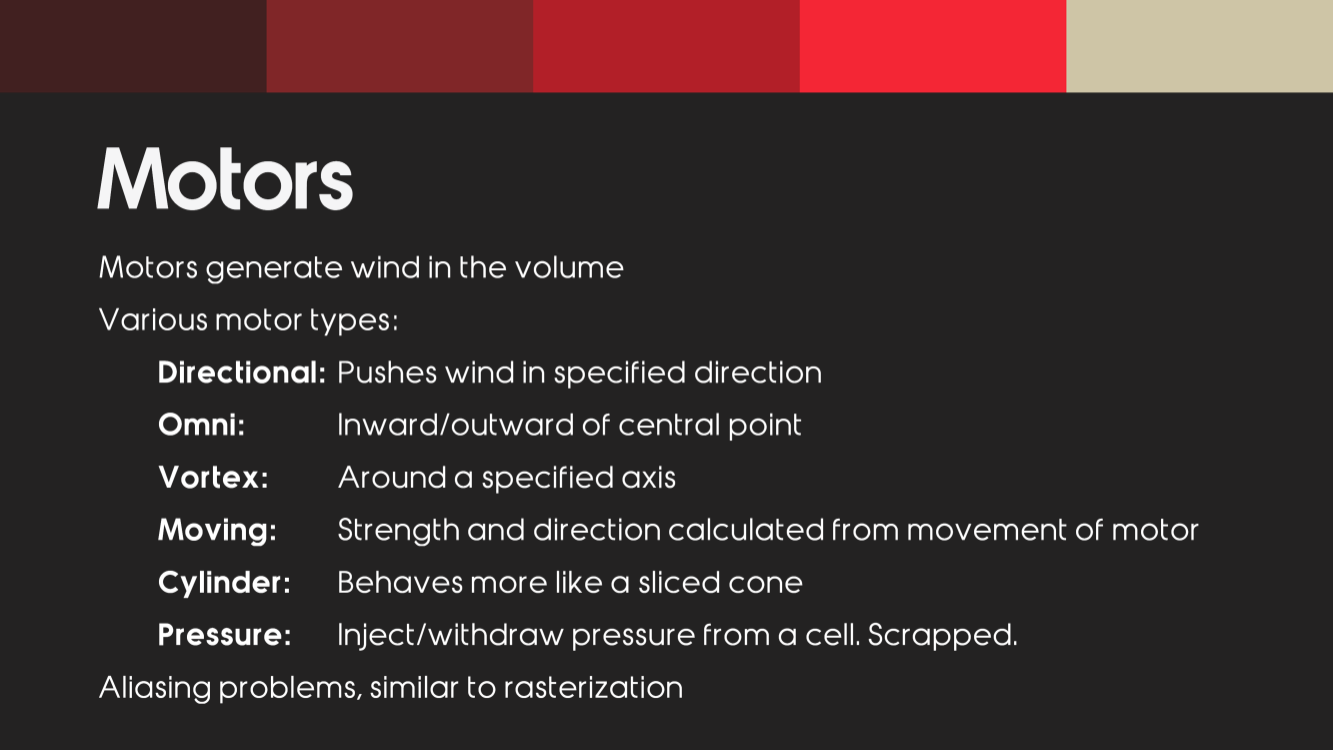
风的产生设计了不同类型的“发动机”,用来给风场注入速度。
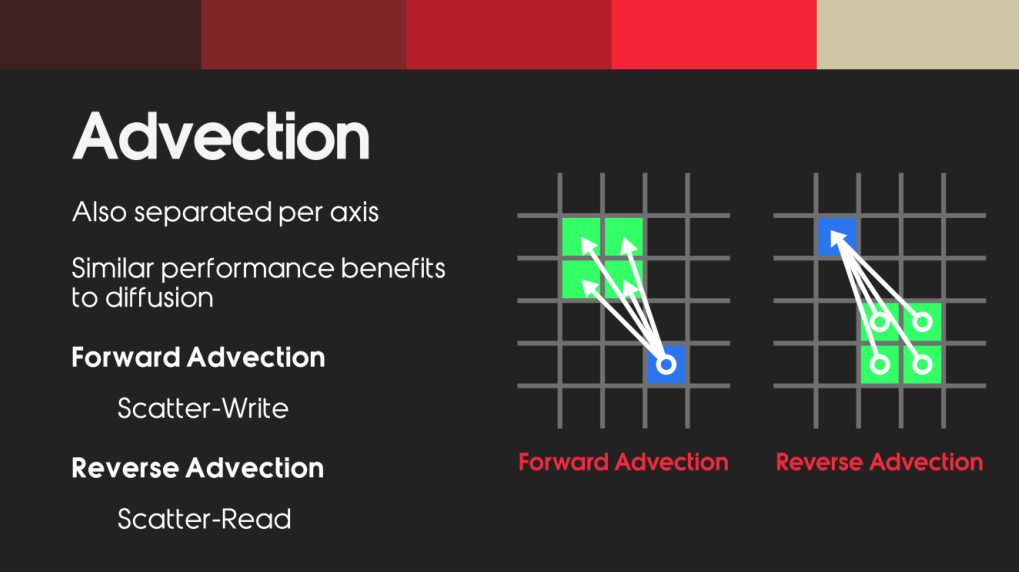
战神里面的Advection 对流提供了,正向和反向的2种,他们强烈建议别图便宜只搞一种。
他们尝试过用压强来模拟风场,但是他们的美术不喜欢,而且压强有个弊端,就是不能是负的。但是压强他们也做了,把压强做为一个额外的使用参数。
渲染管线接入 系统通过 ScriptableRendererFeature (WindSimulationFeature.cs) 将风场计算精确注入到 BeforeRendering 阶段,确保风场数据在几何渲染前就绪。
C# 调度中心 WindManager.cs 是系统的大脑,负责维护核心的 Ping-Pong 双缓冲 float4 的 RenderTexture),并在每帧极其严谨地调度和分发各个物理计算阶段Shift -> Motor -> Diffusion -> Vorticity -> Advection的 Compute Shader 内核。
风源对象池管理 在 WindManager 中采用了 Unity 原生的 UnityEngine.Pool.ObjectPool 进行风源对象的池化管理,彻底杜绝了运行时的内存碎片和垃圾回收卡顿。
//TODO 贴代码
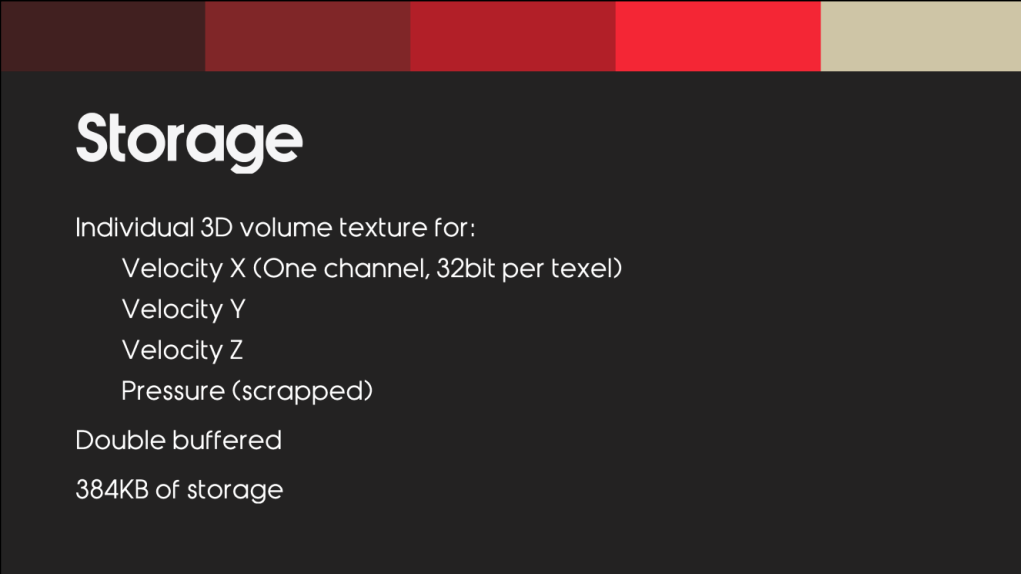
Buffer 存储
战神的设计中每个属性都有单独的三维纹理,x的速度,y的速度,z的速度,本项目简化了 3D Texture 的使用,全程使用单张 <font style="color:rgb(25, 27, 31);">Texture3D<float4></font> 作为主干,仅在必须保证 原子操作 的 Scatter 阶段使用 <font style="color:rgb(25, 27, 31);">RWStructuredBuffer</font> 进行 中转与自我清零。
XZ 的切片,基于风主要是水平移动的考量,设计数据局部缓冲
2. 动态风源系统 (Wind Motors) 基于结构体和 ComputeBuffer 通信的高效风源注入模块,支持五种核心流体受力模型:
Directional (定向风) :产生持续的平面推进力。Omni (点源风) :模拟爆炸冲击波或向外扩散的球形排斥力。Vortex (涡流风) :基于叉乘计算,产生龙卷风般的强烈旋转气流。Moving (移动尾流) :精准模拟物体划过空气时带动的动态尾迹流体。**Cylinder(圆柱风/风洞)**在一段受限的圆柱(或圆台)区间内,沿着轴向产生推力。
**Pressure:(气压风) **~~~~向一个区域注入/撤回压力。已废弃。
Constants Shader 常量
通过 uniform 常量 来传递马达信息到 Shader 中
1
2
3
4
5
6
7
8
9
10
11
12
13
14
15
16
17
18
19
20
21
22
23
24
25
26
27
28
29
30
31
32
33
34
35
36
37
38
39
40
41
42
43
44
45
46
47
48
49
50
51
52
53
54
55
56
57
58
59
60
61
62
63
64
65
66
67
68
69
70
71
72
73
74
75
76
77
78
79
80
81
82
83
84
85
86
87
88
89
90
91
92
93
94
95
96
97
98
99
100
101
102
103
104
105
106
107
108
109
110
111
112
113
114
115
116
117
118
119
120
121
122
123
124
struct MotorDirectional {float radiusSq;float radiusSq;float force;float radiusSq;float force;float moveLen;float radiusSq;float force;float height;float radiusBottonSq;float radiusTopSq;float force;float radiusSq;float force;void ApplyMotorDirectional(float3 cellPosWS, MotorDirectional motor, inout float3 velocityWS)float distanceSq = DistanceSq(cellPosWS, motor.position);if (distanceSq < motor.radiusSq) velocityWS += motor.force;void ApplyMotorOmni(float3 cellPosWS, MotorOmni motor, inout float3 velocityWS)float distanceSq = LengthSq(dir);if (distanceSq < motor.radiusSq)min (rsqrt(distanceSq), 5.0 );void ApplyMotorVortex(float3 cellPosWS, MotorVortex motor, inout float3 velocityWS)float distanceSq = LengthSq(dir);if (distanceSq < motor.radiusSq)cross (motor.axis, dir * rsqrt(distanceSq));void ApplyMotorMoving(float3 cellPosWS, MotorMoving motor, inout float3 velocityWS)float moveLen = clamp (dot (dirPre, motor.moveDir), 0.0 , motor.moveLen);float distanceSq = LengthSq(dirCur);if (distanceSq < motor.radiusSq)normalize (rsqrt(distanceSq) * dirCur + motor.moveDir);void ApplyMotorCylinder(float3 cellPosWS, MotorCylinder motor, inout float3 velocityWS)float h = dot (pToCell, motor.axis);if (h >= 0.0 && h <= motor.height)float distSq = DistanceSq(cellPosWS, projPoint);float t = h / motor.height;float currentRadiusSq = lerp(motor.radiusBottonSq, motor.radiusTopSq, t);if (distSq < currentRadiusSq)void ApplyMotorPressure(float3 cellPosWS, MotorPressure motor, inout float3 velocityWS)float distSq = LengthSq(dir);if (distSq < motor.radiusSq)float dist = sqrt (distSq);float radius = sqrt (motor.radiusSq);float falloff = 1.0 - (dist / radius); normalize (dir) * motor.force * falloff;
3. 计算流体力学 (CFD) 模拟管线 现在到了整个风场管线的核心部分,我们在 Compute Shader (WindSimulation.compute & WindSimulation.hlsl) 内部实现了一个高度优化的网格流体模拟器,考虑风的行为包含:扩散,平流,自旋,以下是核心物理步骤:
空间平移 (Shift) 当目标(如相机)移动时,动态偏移体积网格,使高精度风场始终包裹核心区域。
1
2
3
4
5
6
7
8
9
10
11
[numthreads(THREAD_GROUP_SIZE, THREAD_GROUP_SIZE, THREAD_GROUP_SIZE)]void CSWindShiftPosition(uint3 id : SV_DispatchThreadID)if (any (id > (uint3)VolumeSizeMinusOne)) return ;bool outB = any (src < 0 ) || any (src > VolumeSizeMinusOne);0 ,0 ,0 ,0 ) : WindBufferInput[src];
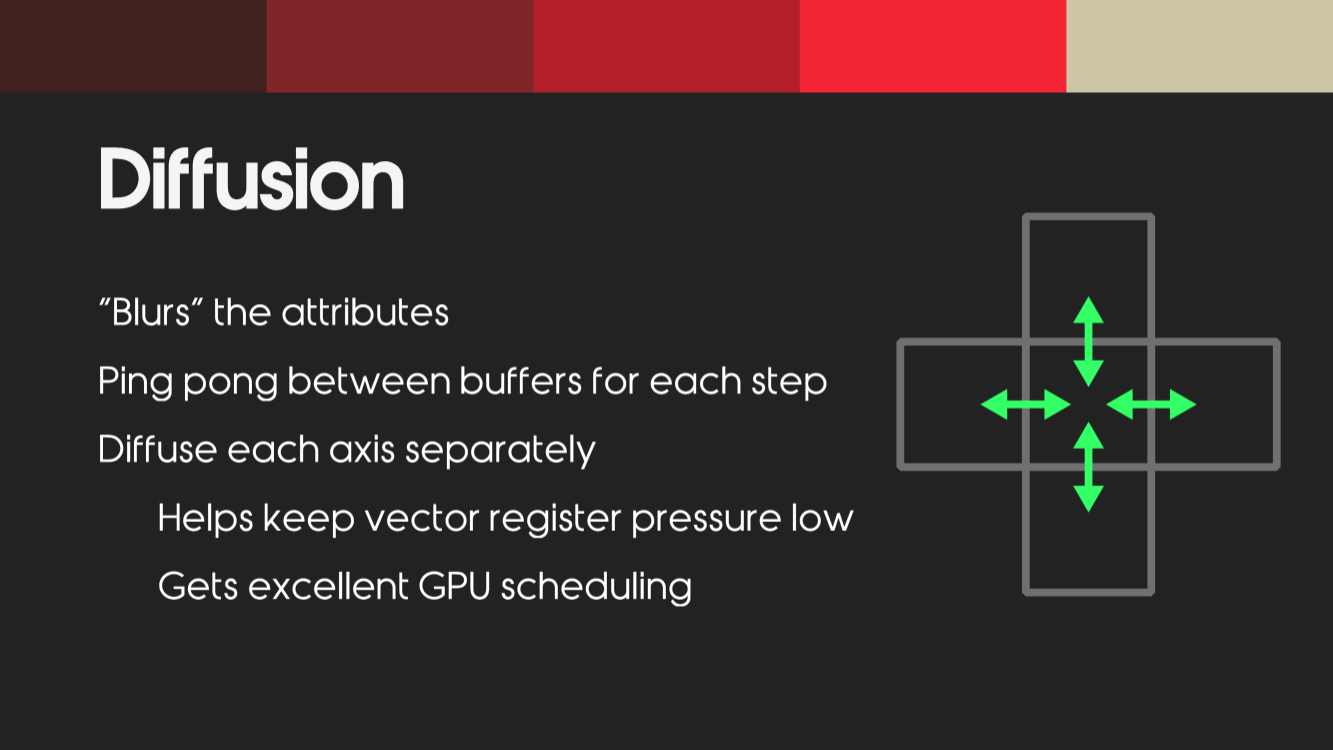
粘性扩散 (Diffusion) 摒弃昂贵的全局显存读取,引入了 LDS (Local Data Share / 组内共享内存) 优化。通过为 8x8x8 的线程组建立 10x10x10 的光晕缓存 (Halo Cache),让极其耗费带宽的拉普拉斯算子 计算全部在 GPU 高速 SRAM 内完成,性能有了极大的飞跃。
LDS/Halo Cache/ 拉普拉斯算子
1
2
3
4
5
6
7
8
9
10
11
12
13
14
15
16
17
18
19
20
21
22
23
24
25
26
27
28
29
30
31
32
33
34
groupshared float3 m_Cache[1000 ]; void LoadToCache(uint idx, uint3 Gid)if (idx >= 1000 ) return ;10 , (idx / 10 ) % 10 , idx / 100 );clamp (int3(Gid * 8 ) + c - 1 , 0 , VolumeSizeMinusOne);void CSWindDiffusion(uint3 id : SV_DispatchThreadID, uint3 groupThreadID : SV_GroupThreadID, uint3 groupID : SV_GroupID)uint flatIdx = groupThreadID.x + groupThreadID.y * 8 + groupThreadID.z * 64 ;512 , groupID); if (any (id > (uint3)VolumeSizeMinusOne)) return ;1 ;#define GET_CACHE(x,y,z) m_Cache[(z)*100 + (y)*10 + (x)] 1 , c.y, c.z);1 , c.y, c.z);1 , c.z);1 , c.z);1 );1 );6.0 * windInput;0.0 );
涡度限制 (Vorticity Confinement) 在这个3D 体积风场项目中,旋度限制(Vorticity Confinement) 是赋予流体“灵魂”的核心技术。没有它,风场就像是平淡无奇的推力;有了它,风场才会展现出龙卷风般的卷曲、湍流和撕裂感。
核心痛点:为什么要引入旋度? 在图形学中,尤其是使用** MacCormack 或半拉格朗日法(Gather 采样 )进行流体平流(Advection)时,需要不断地对 3D 纹理进行三线性插值采样 (SampleTrilinear) **。
物理代价: 插值本质上是一种“模糊(Blur)”操作。视觉后果: 这种被称为数值耗散(Numerical Dissipation)的现象,会吃掉流体中的 高频能量 。风场原本应该卷曲的漩涡,会随着时间推移被迅速磨平,最后看起来像是在搅动粘稠的糖浆,而不是凌厉的狂风。
旋度限制的目的,就是把这些被“插值模糊”吃掉的旋转能量,人为地、暴力地重新注入回流体中。
也就是说**,为了弥补流体网格带来的动能流失,引入了涡度补偿机制**。通过计算旋度场 (Curl Field) 提取漩涡能量,并加入了“速度阈值熔断”、“安全归一化”、“平滑过渡遮罩”和“相对动量截断”这四重安全锁,在消除底噪的同时,完美还原了狂暴卷曲的湍流细节。
物理数学原理 在流体力学中,这套算法可以被拆解为极其经典的三个步骤:
1. 找漩涡(计算旋度 Curl)
它是一个向量,指向旋转的轴心,长度代表旋转的剧烈程度。
2. 找漩涡中心(计算梯度 Gradient)
在物理意义上,梯度方向
3. 推一把(注入补偿力 Confinement Force)
这里的 VorticityScale。
项目中的工程实现 在项目的 Compute Shader 架构中,这套理论被拆分为了两个 Pass,并加入了四重安全防护:
Pass 1: CSWindCalculateVorticity (信息收集)
有限差分法 :通过读取上下左右前后 6 个邻居的风速,利用**离散数学近似计算出旋度 **(Curl)。复用中转纹理 :将计算结果存储在 WindBufferIntermediate 中。绝妙的是,利用了 float4 的特性,xyz 存储旋度向量,w 存储旋度强度(向量长度),为下一个 Pass 节省了大量 ALU 开销。
1
2
3
4
5
6
7
8
9
10
11
12
13
14
15
16
17
18
19
20
21
22
[numthreads(THREAD_GROUP_SIZE, THREAD_GROUP_SIZE, THREAD_GROUP_SIZE)]void CSWindCalculateVorticity (uint3 id : SV_DispatchThreadID)if (any (id > (uint3)VolumeSizeMinusOne)) return ;1 ,0 ,0 ))].xyz;1 ,0 ,0 ))].xyz;0 ,1 ,0 ))].xyz;0 ,1 ,0 ))].xyz;0 ,0 ,1 ))].xyz;0 ,0 ,1 ))].xyz;0.5 ;length (curl));
Pass 2: CSWindApplyVorticity (施加修饰力与四重限制) 如果直接把纯理论公式放进游戏,稍微大一点的风就会导致画面出现“黑洞”或满屏闪烁(噪点放大)。我们增加了 4 重安全防护:
速度阈值熔断 (Speed Threshold)
if (speed < 0.05) return; 作用: 彻底掐断无风区的浮点数底噪。防止极微弱的运算误差被系统当成漩涡放大,保证无风区绝对干净。
安全归一化 (Safe Normalize)
if (N_length < 1e-6) return;作用: 避免了暴力的 +1e-5 带来的方向偏差(偏差会导致无风区出现莫名其妙的对角线微风),保证梯度的绝对准确。
平滑过渡遮罩 (Fade Mask)
smoothstep(0.05, 0.2, speed)作用: 让涡度力在微风向大风过渡时平滑介入,消灭风场边缘可能出现的块状撕裂感。
相对动量截断 (Relative Momentum Clamp -)
maxAllowedForce = speed * 0.1 作用: 强制规定补充的“旋度力”绝对不能超过当前风速的 10%。它把补偿力死死限制在“修饰力”的范围内,彻底杜绝了“涡度爆炸(Vorticity Explosion)”组成的正反馈死循环。
1
2
3
4
5
6
7
8
9
10
11
12
13
14
15
16
17
18
19
20
21
22
23
24
25
26
27
28
29
[numthreads(THREAD_GROUP_SIZE, THREAD_GROUP_SIZE, THREAD_GROUP_SIZE)]void CSWindApplyVorticity (uint3 id : SV_DispatchThreadID)float c_r = WindBufferIntermediate[clampBorder(i + int3(1 ,0 ,0 ))].w;float c_l = WindBufferIntermediate[clampBorder(i - int3(1 ,0 ,0 ))].w;float c_t = WindBufferIntermediate[clampBorder(i + int3(0 ,1 ,0 ))].w;float c_b = WindBufferIntermediate[clampBorder(i - int3(0 ,1 ,0 ))].w;float c_f = WindBufferIntermediate[clampBorder(i + int3(0 ,0 ,1 ))].w;float c_k = WindBufferIntermediate[clampBorder(i - int3(0 ,0 ,1 ))].w;float N_length = length (N);if (N_length < 1e-6 ) 0.0 );return ;cross (N, c_c.xyz) * VorticityScale;
通过这套理论与工程的双重加持,风场系统在保证极高运行效率的同时,完美保留了计算流体力学中最迷人的混沌与翻滚细节!
对流 (Advection/平流 ): 对流 是基于速度传递能量的过程,发生在纹理和纹理之间,可以用来传播速度属性。
处理平流可以处理diffusion扩散一样,按轴进行分离,减少等待时间。
但是会存在一个问题,在做迭代的时候, 正向和反向的会同时对数据读写, ****写入数据的时候发生数据争抢 。多线程的时候可能同时有不同的线程在往texel纹理中写数据。
系统目前保留了两套的流体平流方案供无缝切换:
Scatter (前向原子散射) :利用巧妙的 1D 展平定点数数组 (RWStructuredBuffer<int>) 和 InterlockedAdd 彻底解决并发写入冲突。这套方案拥有零数值耗散的特性,能极致地保留高频风浪和物理边界。
1 2 3 4 5 6 7 8 9 10 11 12 13 14 15 16 17 18 19 20 21 22 23 24 25 26 27 28 29 30 31 32 33 34 35 36 37 38 39 40 41 42 43 44 45 46 47 48 49 50 51 52 53 54 55 56 57 58 59 60 void CSWindAdvectionForward (uint3 id : SV_DispatchThreadID)if (any (id > (uint3)VolumeSizeMinusOne)) return ;floor (targetPos);1.0 - offsetNeb;1 ,0 ,0 ), velocity * (offsetNeb.x * offsetOri.y * offsetOri.z));0 ,1 ,0 ), velocity * (offsetOri.x * offsetNeb.y * offsetOri.z));1 ,1 ,0 ), velocity * (offsetNeb.x * offsetNeb.y * offsetOri.z));0 ,0 ,1 ), velocity * (offsetOri.x * offsetOri.y * offsetNeb.z));1 ,0 ,1 ), velocity * (offsetNeb.x * offsetOri.y * offsetNeb.z));0 ,1 ,1 ), velocity * (offsetOri.x * offsetNeb.y * offsetNeb.z));1 ,1 ,1 ), velocity * (offsetNeb.x * offsetNeb.y * offsetNeb.z));void CSWindAdvectionReverse (uint3 id : SV_DispatchThreadID)if (any (id > (uint3)VolumeSizeMinusOne)) return ;floor (sourcePos);1.0 - offsetNeb;1 ,0 ,0 );0 ,1 ,0 ); int3 p110 = moveCell + int3(1 ,1 ,0 );0 ,0 ,1 ); int3 p101 = moveCell + int3(1 ,0 ,1 );0 ,1 ,1 ); int3 p111 = moveCell + int3(1 ,1 ,1 );
MacCormack (后向收集与修正) :基于三线性插值的半拉格朗日方法,并巧妙融入了**误差锐化 **和 Min-Max Limiter(局部极值拦截)
这套方案可以理解为 Scatter 的逆向思维版本,规避了原子锁。我们在正向对流中需要互斥的写入风速,那么我们也可以反向查找
1 2 3 4 5 6 7 8 9 10 11 12 13 14 15 16 17 18 19 20 21 22 23 24 25 26 27 28 29 30 31 32 33 34 35 36 37 38 39 40 41 42 43 void CSWindAdvectionForward_MacCormack (uint3 id : SV_DispatchThreadID)if (any (id > (uint3)VolumeSizeMinusOne)) return ;0.0 );void CSWindAdvectionCorrection (uint3 id : SV_DispatchThreadID)if (any (id > (uint3)VolumeSizeMinusOne)) return ;float macCormackWeight = 0.65 ;6 ] = { int3(1 ,0 ,0 ), int3(-1 ,0 ,0 ), int3(0 ,1 ,0 ), int3(0 ,-1 ,0 ), int3(0 ,0 ,1 ), int3(0 ,0 ,-1 ) };for (int i = 0 ; i < 6 ; ++i) min (minV, neighborV);max (maxV, neighborV);clamp (finalVal, minV, maxV);clamp (finalVal, -MaxWindSpeed, MaxWindSpeed);0.0 );uint idx = id.x + id.y * VolumeSize.x + id.z * VolumeSize.x * VolumeSize.y;
4. 工程化 数据流转现代化 现在的工程,全程使用单张 Texture3D<float4> 作为主干,仅在必须保证**原子操作 **的 Scatter 阶段使用 RWStructuredBuffer 进行中转与自我清零 ,兼顾了代码的简洁性与 GPU 底层执行的正确性。
1 2 3 4 5 6 7 8 9 10 11 12 13 14 15 16 17 18 19 20 21 22 23 24 25 26 27 28 29 30 31 32 33 34 35 36 37 38 39 40 41 42 43 44 45 46 47 48 49 50 51 52 53 54 55 56 57 58 59 60 61 62 #define FXDPT_SIZE (float)(1 << 12) #define FXDPT_SIZE_R (1.0 / (float)(1 << 12)) int PackFloatToInt(float f) { return (int )(f * FXDPT_SIZE); }float PackIntToFloat(int i) { return (float )(i * FXDPT_SIZE_R); }int GetFlatIndex(uint3 id)return (id.x + id.y * volSize.x + id.z * volSize.x * volSize.y) * 3 ;void AtomicAdd(RWStructuredBuffer<int > atomicBuffer, uint3 id, float3 velocity)if (any (id >= (uint3)VolumeSize)) return ; int baseIdx = GetFlatIndex(id);1 ], PackFloatToInt(velocity.y));2 ], PackFloatToInt(velocity.z));void CSWindMerge (uint3 id : SV_DispatchThreadID)if (any (id > (uint3)VolumeSizeMinusOne)) return ;int baseIdx = GetFlatIndex(id);float x = PackIntToFloat(WindAtomicBuffer[baseIdx]);float y = PackIntToFloat(WindAtomicBuffer[baseIdx + 1 ]);float z = PackIntToFloat(WindAtomicBuffer[baseIdx + 2 ]);clamp (float3(x, y, z), -MaxWindSpeed, MaxWindSpeed), 0.0 );void CSWindMergeAndClear (uint3 id : SV_DispatchThreadID)if (any (id > (uint3)VolumeSizeMinusOne)) return ;int baseIdx = GetFlatIndex(id);float x = PackIntToFloat(WindAtomicBuffer[baseIdx]);float y = PackIntToFloat(WindAtomicBuffer[baseIdx + 1 ]);float z = PackIntToFloat(WindAtomicBuffer[baseIdx + 2 ]);clamp (float3(x, y, z), -MaxWindSpeed, MaxWindSpeed);0.0 );uint idx = id.x + id.y * VolumeSize.x + id.z * VolumeSize.x * VolumeSize.y;0 ;1 ] = 0 ;2 ] = 0 ;
浮点数与定点数(Fixed-Point Number)的互相转换
Debug
好的debug工具可以事半功倍
1
2
3
4
5
6
7
8
9
10
11
12
13
14
15
16
17
18
19
20
21
22
23
24
25
26
27
28
29
RWTexture2D<float4> WindDebugTexture2D;uniform int DebugGridCols;8 , 8 , 1 )]void CSWindDebugFlatten(uint3 id : SV_DispatchThreadID)uint sliceX = id.x / VolumeSize.x;uint sliceY = id.y / VolumeSize.z; uint sliceIdx = sliceY * DebugGridCols + sliceX;if (sliceIdx < (uint )VolumeSize.y)abs (vel) / MaxWindSpeed; if (id.x % VolumeSize.x == 0 || id.y % VolumeSize.z == 0 ) 0.8 , 0.8 , 0.8 );1.0 );else 0 , 0 , 0 , 1.0 );
结语 一个物理法则极其严谨、内存调度极其干净、并且拥有极高定制化上限的 3D 流体中间件。它可以被无缝地用于驱动大规模 GPU Instancing 草地、或是体积云,体积雾系统中。
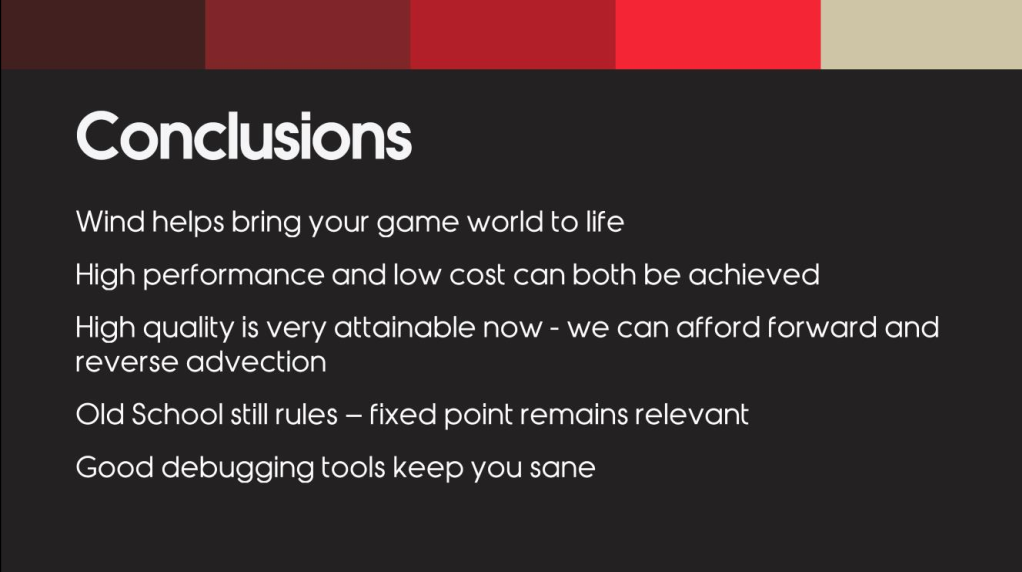
风的模拟使游戏更加生动 高性能和低消耗也是可以实现的 正向平流和反向一定要同时使用 好的debug工具可以事半功倍